Delete Your Account
This page explains how to delete your account on Valour, the community chat platform operated by
Valour Software LLC. It applies to Valour on every platform, including the Android app
(gg.valour.app), the other desktop and mobile apps, and Valour on the web. One account works across all of them, so deleting it once
removes it everywhere. You do not need the app installed to delete your account.
Delete your account in Valour
- Sign in to the Valour app, or go to app.valour.gg in any browser.
- Open Settings with the gear button next to your name at the bottom of the sidebar. On a phone, tap the menu button in the top left corner first to show the sidebar.
- Under General Settings, open Profile and scroll to the Account section.
- Select Delete Account and confirm it's you with your password. If your account has no password, confirm with Google, Discord, or your fingerprint instead. Then select Confirm.
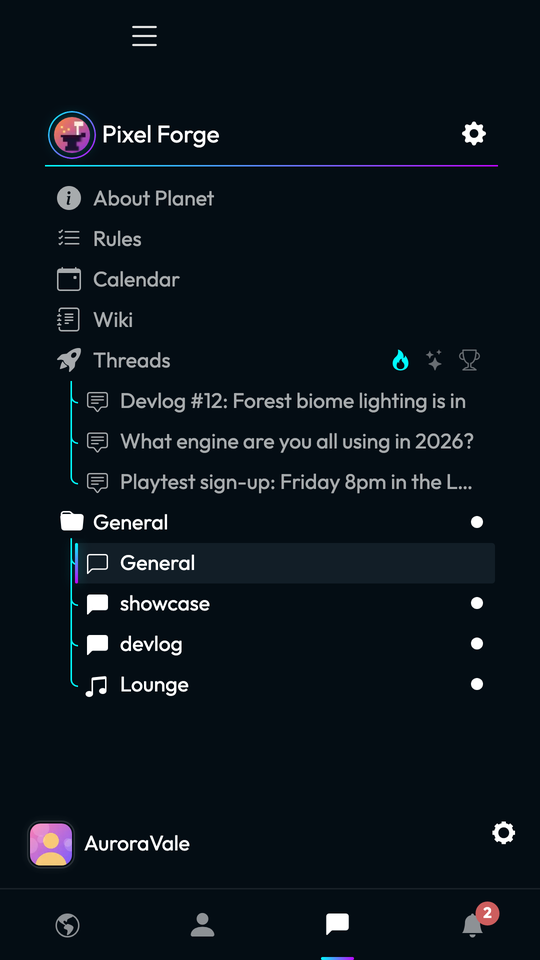
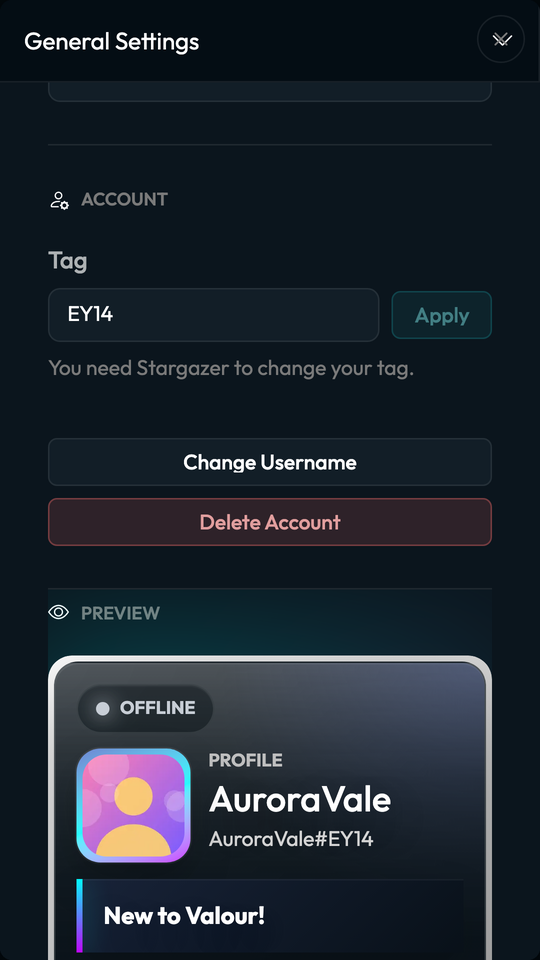
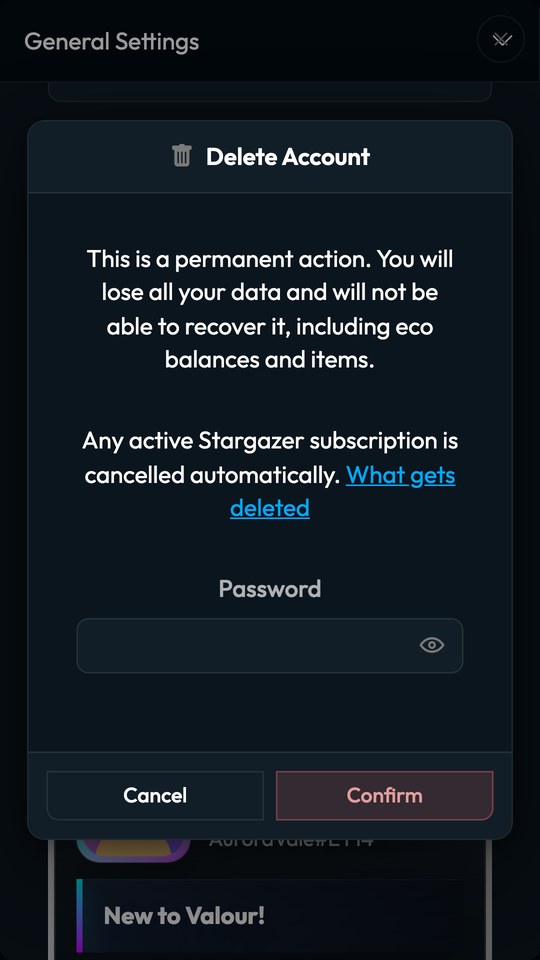
Deletion happens immediately and cannot be undone. You are signed out on every device, and there is no waiting period in which the account can be restored.
If you cannot sign in
If you have forgotten your password, you can reset it from the password recovery page and then follow the steps above.
Otherwise, email support@valour.gg from the email address registered to your account, with the subject "Delete my account" and your username. We may ask you to confirm that you own the account. We complete verified requests within 30 days and reply when the account has been deleted.
What is deleted
- Your account details: email address, password, date of birth, two-factor authentication, linked Google and Discord accounts, fingerprint sign-in keys, and sign-in sessions.
- Your profile, avatar, profile background and preferences.
- Every message you sent, in any channel, with its reactions, mentions and attachments.
- Your direct message conversations. Both sides of a one-to-one conversation are removed.
- Files you uploaded, removed from storage once nothing else uses them.
- Threads you started, including all comments on them. Comments you left on other people's threads are replaced with an empty "deleted" placeholder so replies keep their place.
- Your friends, friend requests, blocks, planet and group chat memberships, planet bans, and invites you created.
- Encrypted key backups, linked devices and pending key requests used for end-to-end encryption.
- Notifications, push notification registrations, calendar RSVPs, activity statistics, planet folders, GIF favorites and referrals.
- Economy accounts, balances, items and transaction history.
- Bots and OAuth applications you own.
- Your Stargazer subscription. Card and Google Play subscriptions are cancelled with no further charges, and the billing customer record held by our payment processor, Stripe, is also deleted. Apple bills App Store subscriptions, so cancel one in your Apple account's subscription settings.
What is kept, and why
- Planets you own. Planets belong to their communities, so they are not deleted. Ownership moves to Valour's system account. To hand a planet to someone else, transfer ownership in the planet's settings before you delete your account.
- Shared planet content. Wiki pages, calendar events, webhooks and themes you published stay available to their communities. They are credited to Valour's system account and are no longer linked to you.
- Your public encryption keys. The log of public keys for your account is kept so other people can still verify messages in shared conversations. It holds public keys only and cannot decrypt anything.
- Safety and moderation records. Reports about your account and moderation logs are kept with the link to your account removed. Files flagged by child-safety checks are preserved when the law requires it.
- Records we are legally required to keep. Data covered by a legal hold or a valid legal obligation is kept only for as long as that obligation lasts. Stripe keeps its own records of past payments as payment regulations require.
If you joined planets hosted on independently operated community nodes, Valour tells those nodes to delete their copy of your account.
Delete some data without deleting your account
- Messages: delete any message you sent from its message menu.
- Files: open Settings, then Attachments, to find and delete files you uploaded.
- Threads and comments: delete them from their menus in the planet's thread feed.
- Friends, blocks and sessions: manage them from the Friends, Safety and Security pages in Settings.
For any other request, email support@valour.gg. Our Privacy Policy describes all of the data we collect and your rights.